Built for your station

HTML5 radio players and hosted station pages

Embed a branded player or launch a station website. Follow your station with mobile insights and stream monitoring on eligible plans.

For your existing website

Embeddable players

Choose a design, add your branding, and give visitors a clear way to listen on the website you already have.

Explore player features ↓

For a dedicated station home

Hosted station websites

Give listeners a station URL with its own player. Choose a focused listen page or a fuller site with Business.

Explore website features ↓

Works with the stream you already run

Connect a direct HTTPS stream from Icecast, SHOUTcast, or a compatible control panel. Keep your broadcasting setup and test your audio in the dashboard.

A branded player you drop on any site

Choose your design and branding on any plan. Add scheduling and domain restrictions on Pro and above.

  • Player designs

    Horizontal sticky bars, compact side widgets, or fuller panels with track history.

  • Brand colours

    Pick colours and dark/light presets so the player matches your site.

  • Live Metadata & Artwork

    Show song and artist information with artwork when suitable metadata is available.

  • Weekly schedule · Pro+

    Show this week's schedule inside the player so listeners know what is on.

  • Track History Feeds

    Let people see the last 6 to 15 tracks, with artwork.

  • Social Profile Integrations

    Put your social links on the player so listeners can follow you in one tap.

  • Domain restrictions · Pro+

    Allow the player embed on approved hostnames. Direct stream URLs remain under your streaming host’s control.
Signal · One of the included player designs

Signal player preview

Actual product interface · Illustrative demo data and settings

Make it yours in the appearance editor

Player theme choices

Actual product interface · Illustrative demo data and settings

Actual product interface · Illustrative demo content. Select a preview to enlarge it.

A dedicated home for your station

Start with a hosted listen page on Pro. Business adds every template, your own domain, events, sponsor banners, and the listener inbox. Each page has its own player, separate from your embeddable-player quota.

  • Visual listening pages

    Pro includes Audio Corona. Business adds templates such as Amoeba and Coastal.

  • Full station websites · Business+

    Bring shows, schedules, events, and contact together in one hosted site.

  • Your own domain · Business+

    Point your domain to your station page. SSL is included. Pro pages use our domain.

  • Sponsor banners · Business+

    Upload banners on your hosted page and track clicks in the dashboard.

  • Listener inbox · Business+

    Song requests and shoutouts from the page land in one inbox.

  • Multiple languages

    Offer your page in more than one language on Pro and above.

Broadcast · Demo station

Broadcast station website

Live station template · Demo station content

Station website on a phone

Live station template · Demo station content

Actual station templates and dashboard · Illustrative demo content. Select a preview to enlarge it.

The station dashboard

One place to manage the listening experience.

Update players and station pages, review activity, and manage the tools included with your plan.

Basic analytics on every plan · Advanced on Pro+

Understand your audience

Review listening activity and use the available reports to understand when and where your audience tunes in.

Pro and above

Control where the player loads

Set country and domain restrictions for your player. Your streaming provider still controls access to its direct audio URLs.

Pro and above

Offer more ways to listen

Assign multiple streams so listeners can choose a channel or bitrate from your player.

Every plan

Keep your station up to date

Update saved player settings from the dashboard. Your existing embed uses the updated configuration.

Business and above

Export your track history

Download track logs for your reporting workflow. Check the format and requirements of your licensing organisation.

WRP Companion · Android

Your station,
within reach.

Away from your desk? Check your station from your phone, with the tools that matter between broadcasts.

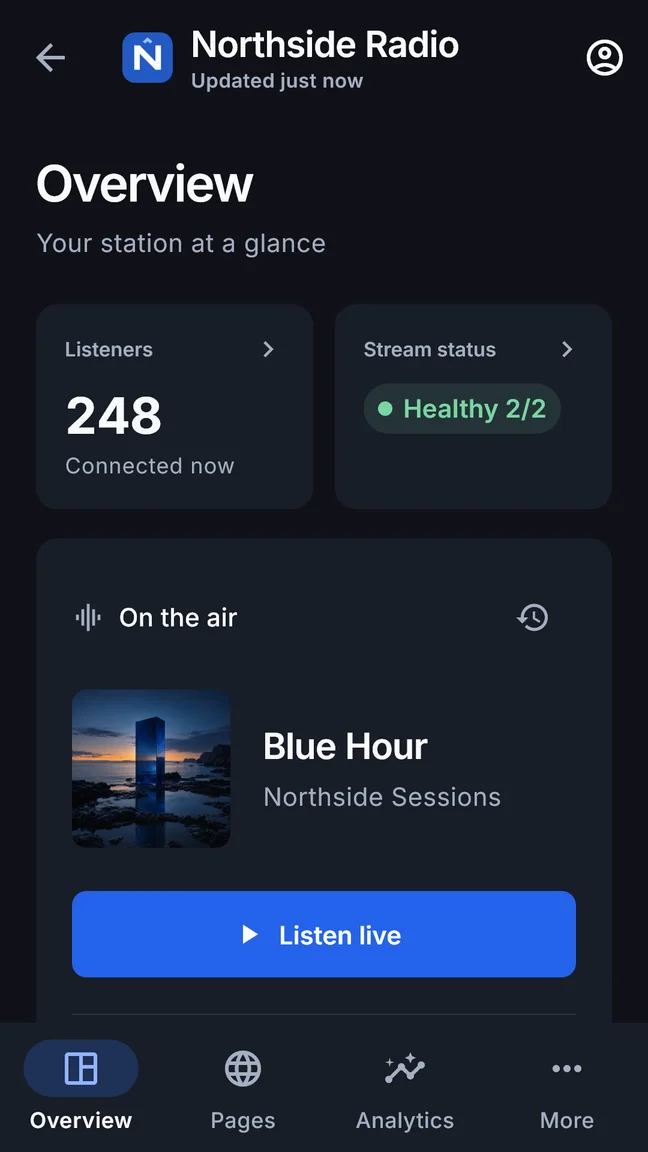
  • A quick look at your station.Check stream health, current listeners and what’s playing.
  • A closer look at listening activity.Explore the audience insights available with your plan.
  • Your station page, ready to share.Share a public-page link or QR code from your phone.

For existing WRP customers. Companion access is included with every plan; available tools follow your plan and station settings.

Get it on Google Play

Available for Android on Google Play. An iOS version is not available.

WRP Companion station overview with current listeners, stream health and now-playing information
Actual app screen · Illustrative station and data

Follow your audience

Explore listening trends and comparisons on an eligible plan, with station analytics enabled. Recorded sessions are visits, not a count of unique listeners.

Keep everyday controls close

Find and pin stations, manage supported country restrictions, and preview, share or publish existing public pages. Available controls depend on your plan.

Keep the dashboard for setup

Full player configuration and subscription management stay in the web dashboard. The companion needs an internet connection to retrieve station data.

Silence & offline detection · Pro and above

Know when your stream
needs attention.

Keep an eye on your audio without listening all day. WRP checks your monitored streams for silence and offline status.

  1. Check the stream

    Server-side checks look for silence or an unreachable stream at intervals.

  2. Filter brief interruptions

    Email alerts flag sustained problems, helping avoid nuisance messages for short incidents.

  3. Find out and investigate

    Receive email alerts. Android companion alerts also depend on app activity and notification settings.

Checks and alerts take time and can miss brief interruptions. Companion alerts depend on app activity, device settings and notification permission; delivery while the app is closed is not guaranteed.

Server-side monitoring and email alerts do not depend on the companion app being open. Monitoring helps you investigate a problem; it does not automatically repair your stream or switch to a backup.

Companion and monitoring questions

Availability, plan access and how stream alerts work.

WRP Companion brings station health, listening activity and public-page sharing to Android. It is for existing WRP account holders, with access included in every plan and available tools depending on your plan and station settings. Available for Android on Google Play. An iOS version is not available.

Pro includes up to 3 monitored streams; Business includes up to 10. Enterprise monitoring capacity is agreed with us. Monitoring is not included with Starter. A monitored stream is a managed stream checked for silence and offline status. Email alerts flag sustained problems to avoid unnecessary messages for brief interruptions. Monitoring does not depend on keeping the companion app open.

Checks run at intervals, so detection and delivery take time and brief interruptions can be missed. Email alerts are delayed to filter short incidents. Companion alerts depend on app activity, device settings, internet access and notification permission. Installing the app does not guarantee alerts while it is closed. Monitoring does not automatically repair or switch your stream.

Use the companion for station checks, available audience insights, public-page sharing and supported everyday controls. Full player configuration and subscription management stay in the web dashboard. Advanced analytics require an eligible plan and analytics enabled for the station.

Find the right fit for your station.

Try the live designs, then compare the players, pages, and tools included with each plan.